 C(R) = { t | C is true
for t }
The Relational Algebra and SQL
C(R) = { t | C is true
for t }
where is the selection operator, C
is the selection condition, and R is a relation. The selection
condition is a well-formed logical expression built from the following rules:
Name = 'Sue'
Name = 'Sue' AND Age >
  23
NOT (Name = 'Sue' AND Age
  > 23)
Let's look at some example of selection, and the meaning will become clear. Consider the relation Professions.
Professions
Name | Job
---------------------
Joe | Garbageman
Sue | Doctor
Joe | Surfer
Now consider the following selections and their results.
Name = Sue(Professions)
=
Name = Sue OR Job
= Surfer(Professions) =
Name = Sue AND Job
= Surfer(Professions) =
What does selection do in terms of the table metaphor? It merely selects those rows from the table that satisfy the selection condition, ignoring the rest. Note that the selected rows form a new table (possibly an empty table).
 A1, A2,
..., AM(R) = { (t[A1],
t[A2], ... t[AM])
| t
 R
}
where is the projection operator, A1,
A2, ..., AM is a list of the
first M attributes, and R is a relation. In general, we can
project any of the attributes in a relation in any order. Let's look at some
examples from the Professions relation depicted above.
Job(Professions)
would produce the following relation.Name(Professions)
would produce the following relation (assuming we retain duplicates)or this table (assuming we eliminate duplicates)
Name
--------
Joe
Sue
 S =
{((a1, a2, ..., aN,
b1, b2, ..., bM)
| (a1, a2, ..., aN)
R AND
(b1, b2, ..., bM)
S }
S
is not the same as S
R because the order of attributes differs.
Let's look at an example. Assume that in addition to the Professions relation, we have a Salaries relation.
Salaries
Job |
Pays
------------------------
Garbageman | 50000
Doctor | 40000
Surfer | 6500
Careers is depicted below.
     Name  |   Job       |  Job       |   Pays
   ---------------------------------------------
     Joe   |  Garbageman | Garbageman  |  50000
     Joe   |  Garbageman | Doctor      |  40000
     Joe   |  Garbageman | Surfer      |   6500
     Sue   |  Doctor     | Garbageman  |  50000
     Sue   |  Doctor     | Doctor      |  40000
     Sue   |  Doctor     | Surfer      |   6500
     Joe   |  Surfer     | Garbageman  |  50000
     Joe   |  Surfer     | Doctor      |  40000
     Joe   |  Surfer     | Surfer      |   6500
Note that we have two attributes now with the same name, Job, we
will assume that one of the attributes is renamed appropriately.

 S = (R
S)
.
Let's look at an example. The result of
Job
= Job Careers
     Name  |   Job       |  Job       |   Pays
   ---------------------------------------------
     Joe   |  Garbageman | Garbageman  |  50000
     Sue   |  Doctor     | Doctor      |  40000
     Joe   |  Surfer     | Surfer      |   6500
, can be any
well-formed logical expression, but usually it is just the conjunction of
equality comparisions between pairs of attributes, one from each of the joined
relations. This common case is called an equi-join. The example given
above is an example of an equi-join.
is omitted from a we will assume
that the operation is a natural join. Let
S = A1,...,An,X1,...,Xm,B1,...,Bk(R
X1 = X1
AND ... AND Xm = X1
S)
Let's look at an example. The result of
Careers
     Name  |   Job       |   Pays
   ---------------------------------
     Joe   |  Garbageman |  50000
     Sue   |  Doctor     |  40000
     Joe   |  Surfer     |   6500
A3, A2,
A1(S)
  STUDENTS
    name | subject
   ----------------
    joe  |  CP1500
    joe  |  CP1200
    sue  |  CP3020
PARENTOF parent| name ---------------- pam | joe pam | sue ann | pam eric | ann
The Cartesian product of these relations,
STUDENTS
    parent | name | name | subject
 ----------------------------------
     pam   |  joe |  joe | CP1500
     pam   |  joe |  joe | CP1200
     pam   |  joe |  sue | CP3020
     pam   |  sue |  joe | CP1500
     pam   |  sue |  joe | CP1200
     pam   |  sue |  sue | CP3020
     ann   |  pam |  joe | CP1500
     ann   |  pam |  joe | CP1200
     ann   |  pam |  sue | CP3020
     eric  |  ann |  joe | CP1500
     eric  |  ann |  joe | CP1200
     eric  |  ann |  sue | CP3020
The equi-join (on the name attribute),
name
= name STUDENTS
    parent | name | name | subject
 ----------------------------------
     pam   |  joe |  joe | CP1500
     pam   |  joe |  joe | CP1200
     pam   |  sue |  sue | CP3020
Finally, the natural join,
STUDENTS
    parent | name | subject
 ----------------------------------
     pam   |  joe | CP1500
     pam   |  joe | CP1200
     pam   |  sue | CP3020
Now let's consider several examples using these relations.
subject, name(STUDENTS)
What are the names of the students?: STUDENTNAMES =
Who is taking CP1500?: CP1500 =
Who is the parent of joe?: JOES_PARENTS =
The above three examples were all operations on a single table. We must use a join to combine information from two or more tables.
Who is the parent of a student taking CP1500?: In this example, we make use of the result of a previous query, the CP1500 relation is computed above. CP1500_PARENTS =
Who is the grandparent of of a student taking CP1500?: CP1500_GRANDPARENTS =
Exercise
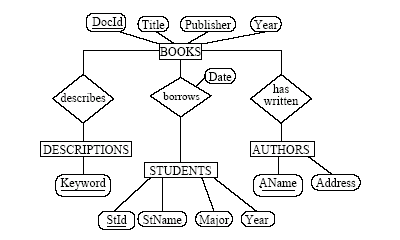
1 Assume the following relations:
BOOKS(DocId,
Title, Publisher, Year)
STUDENTS(StId,
StName, Major, Age)
AUTHORS(AName,
Address)
borrows(DocId,
StId, Date)
has-written(DocId,
AName)
describes(DocId, Keyword)
Here it is the entity relationship diagram. The key fields of the relations are underlined in the entity relationship diagram.
Write the following queries in relational algebra.
List the year and title of each book.
List all information about students whose major is CS.
List all students with books they can borrow.
List all books published by McGraw-Hill before 1990.
List the name of those authors who are living in Davis
List
the name of students who are older than 30 and who are not studying
Rename AName in the relation AUTHORS to Name.
List the names of all students who have borrowed a book and who are CS majors.
List the title of books written by the author ’Jones’.
As previous, but not books that have the keyword ’database’.
Find the name of the youngest student.
Find the title of the oldest book.
Exercise2 Consider the following schema:
Suppliers( sid: integer, sname: string, address: string );
Parts( pid: integer, pname: string. color: string );
Catalog( sid: integer, pid: integer, cost: real );
Execute the script to creating tables (The script contains all tables used in Chapter 5 in the textbook - not only these used in this exercise ). Load data into the tables.
Find the pid of parts with cost lower than 10$
Find the name of parts with cost lower than 10$
Find the address of the suppliers who supply "Fire Hydrant Cap"
Find the name of the suppliers who supply green parts
Here are the script and the data files