Lab 1 FLEX Quick Start
Part 3: What's my task in lab 1?
Part 1. What is Scanner?
Think about the compiler you have used, i.e. g++, gcc, javac, python etc, --exactly what does compiler do? A compiler takes a source program written in a high-level programming language (such as C++) and converts it to a lower-level language (such as machine instructions). The first stage of a compilation is to analyze the characters of the source program and produce a sequence of meaningful pieces called tokens. The production of the tokens is called lexical analysis because the term lexical describes actions that involve the "words" of a language. Another name for a lexical analyzer is a scanner.
For example, here's a C++ statement:
int age = 5;
The scanner of a C++ compiler might produce the following sequence of tokens:
* The keyword int (int is a reserved word in C++)
* The variable age
* The operator =
* The constant 5
* The semi-colon
In Lab 1, you'll need to use regular expressions, which forms a basis for building scanners.
Part 2. How to use FLEX?
FLEX is a tool for generating scanners. You don't need to write a scanner by yourself. You only need to write a specification of the scanner, and then FLEX will generate a scanner for you.
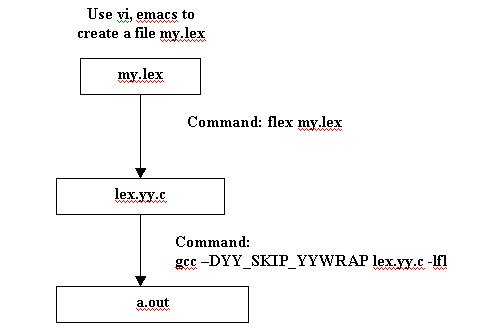
FLEX reads characters from input file if provided. Otherwise, it reads from standard input. The specification is in the form of pairs of regular expressions and C code, called rules. FLEX generates as output a C source file, lex.yy.c, which defines a routine yylex(). FLEX can also generate C++ source file, lex.yy.cc, which is out of scope of this lab. In other words, you only need to generate C source file in this lab.
Basic steps as follows:
A typical FLEX input file (my.lex, for example) has the following structure:
definitions
%%
rules
%%
user code
Some useful variables or functions in flex:
yylex(): Each time yylex() is called it continues processing tokens from where it last left off until it either reaches the end of the file or executes a return.
char * yytext: text of the current matched token
int yyleng: length of the matched token
FILE * yyin: global input file (which defaults to standard input)
YY_INPUT(buf, result,max_size): The scanner usually reads in max_size characters to a buffer, scan it. In other words, scanner reads the input in blocks, not in characters.
FILE *yyout: the file to which 'ECHO' actions are done
Some Flex Documentation and Example:
Sample flex input file, from which you can compose your own scanner for MiniJava:
A complex real-world example of a scanner for Java (for reference only):
Note: In this lab, we are not going to return anything in each rule. We only need to call printf() to print out the meaning of the token.
Part 3. My task in the lab?
1. Please download a flex file here, understand the content, generate a lex.yy.c file, then use gcc to compile it. Execute it and see what's the output.
2. Change the rules a little by yourself, see what happens.
3. Start to think and compose a scanner for MiniJava.