CS152: Assignments
Note: All assignments should be submitted via the turnin system. The
turnin program always keeps the most recent version of the program submitted.
Assignment 1
Assigned: Wednesday, June 28, 2006, in class
Due: Wednesday, July 5, 2006, 23:59
Late submission accepted until: Friday, July 7, 2006, 23:59.
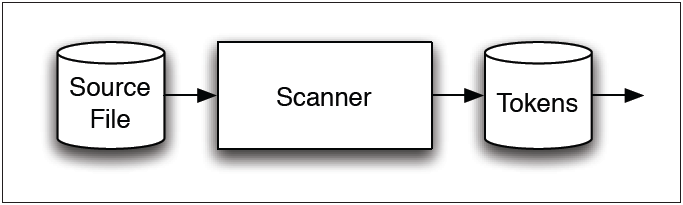
[picture taken from slides by Peter H. Froelich]
Goal: Write the lexical-analysis specification for
JFlex for the MiniJava language.
Steps:
- Read the "Lexical Issues" section of the MiniJava
specification.
- Read the on-line
JFlex manual. Chapter entitled "A simple Example: How to work
with JFlex" might be particularily useful.
- Write the JFlex file for MiniJava. You can use the
MiniJava.jflex skeleton file as the
starting point.
- Study the MiniJava specification of your textbook and collect a complete list of tokens in the MiniJava language.
Consider also the following additions to the MiniJava grammar:
	Type -> String
	Exp -> STRING_LITERAL
String Literal: A string constant is a sequence, between quotas("), of zero or more printable characters, spaces or
escape sequences. Allowed escape sequences are as follows:
	\n	end-of-line
	\t 	tab
	\"	the double-quote
	\\ 	backslash
All other uses of the \ character inside a string literal causes an error.
- Download jflex script which contains paths to the
Java compiler and JFlex classes. chmod +x it to
make it executable. Run jflex script on the file you have written. If everything
goes OK, you will have a file Lexer.java as the
result.
- Compile and build the lexer. Note that JFlex was built (among other things) to be integrated with CUP parser
generator (which is to be used in Assignment 2). However, for this assignment, we're omitting all directives that
would allow one to incorporate the CUP parser generator. Instead, we're generating a standalone lexer using the
%standalone directive inside the MiniJava.jflex skeleton file. The action code is also not returning any token, rather
it should print the matched token onto the screen using the System.out.println() call.
- Test the Lexer class on several sample MiniJava programs:
/usr/csshare/pkgs/jdk1.5.0_05/bin/java -classpath /usr/csshare/pkgs/jdk1.5.0_05/jre/lib/ext/java-cup-v11a.jar:. Lexer <MINIJAVA FILE>
Output format:
The output of your lexer should be the list of tokens (numbered in the order they are matched) printed on the screen
(one token per line) with semantic values placed in parantheses next to the tokens where applicable. Following the list
of tokens, your lexer also needs to report the line and character count of the input file. Sample output is shown below:
	1. SOME_TOKEN
	2. ANOTHER_TOKEN
	3. TOKEN_WITH_SEMANTIC_VALUE(5)
	...
	...
	Total number of lines: <the line count of the input file goes here>
	Total number of chars: <the char count of the input file goes here>
Submission guidelines:
You should only submit your MiniJava.jflex file. No directories,
compressed files, nor any test or other script files should be submitted. We will be taking
off points if your submission fails to follow this guideline.
Sample MiniJava programs:
Assignment 2
To Be Assigned: Wednesday, July 5, 2006, in class
Due: Tuesday, July 11, 2006, 23:59
Late submission accepted until: Wednesday, July 12, 2006, 23:59.
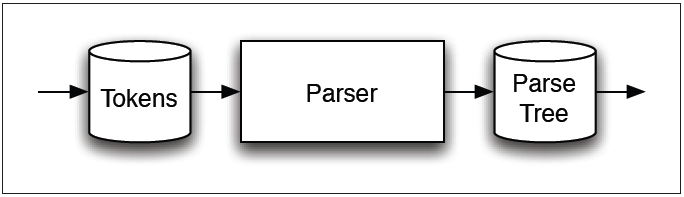
[picture taken from slides by Peter H. Froelich]
Goal: Generate a parser for the modified (check Assignment #1) MiniJava
language using the CUP parser generator .
Steps:
- Study the CUP manual.
- Study the grammar section of the MiniJava
specification. You have to be able to distinguish between the terminals and
non-terminals in your grammar. Terminals are the tokens the parser receives from the lexer.
Non-terminals are the symbols appearing on the left hand side of the production rules in
the grammar and are used to name syntactically equivalent groupings.
- Modify your MiniJava.jflex file from Assignment 1 as directed in Lab
3's "In Lab Exercise" section. However, just make sure you removed the %cupdebug directive before
starting on this assignment.
- Write the CUP parser generator file for MiniJava. You can use the MiniJava.cup skeleton file as your starting
point. Consider also the following additions to the MiniJava grammar:
	Type -> String
	Exp -> STRING_LITERAL
	Exp -> Exp.length()
- Download compile and run-parser
scripts which contain paths to the Java compiler, JFlex and CUP classes. chmod +x it to make them executable.
- Run the compile script on the files you have written as follows:
./compile <your jflex file> MiniJava.cup
- If no error messages are displayed, following files are generated: Lexer.java, Parser.java, Sym.java, after running the script.
- Test your parser on the sample MiniJava programs using the run-parser script as follows:
./run-parser <minijava input file>
- You should also overwrite the method
syntax_error(String message, Object info) to report
the line and column number of a caught syntax error. Your output for syntax
errors should be displayed as follows:
Error in line <line # of the error>, column <column # of the error> : Syntax error
- For MiniJava source files that contain syntax errors, the generated parser prints one more line
of error message which briefly says that the parser couldn't continue to parse. Look in the CUP manual
and find the method that displays the latter error message and ovewrite it so that the second error
message is not printed.
- Please refer to the skeleton file
to see where you should place your error message formatting code.
Output format:
Expected output of your parser is a print out of the production rules reduced in order upon parsing a
given MiniJava source file. The actual values of identifier names, integer and string literals should be
printed on the output rather than the token names that correspond to the respective token classes.
A sample output snippet is shown below:
	exp -> num
	exp -> 1
	exp -> exp < exp
	exp -> 1
	statement -> num_aux = exp ;
	exp -> num
	exp -> this
	exp -> num
	exp -> 1
	exp -> exp - exp
Submission guidelines:
You should only submit your MiniJava.jflex
and MiniJava.cup files. No compressed files, nor
any test or script files should be submitted. Points will be taken off from
your grade if your submission fails to follow this guideline.
Assignment 3
To Be Assigned: Wednesday, July 12, 2006, in class
Due: Monday, July 17, 2006, 23:59
Late submission accepted until: Tuesday, July 18, 2006, 23:59.
Goal: Add semantic actions to your parser to produce an abstract syntax tree for
lexically and syntactically correct MiniJava programs.
Steps:
- Download syntaxtree.jar and visitor.jar jar files.
- syntaxtree.jar file contains compiled Java Syntax Tree classes which are to become the nodes of the built AST.
Respectively, visitor.jar contains the compiled Java Visitor and TypeVisitor interfaces which should help you traverse and
process the formed AST.
- Alternatively, you can also download syntaxtree.tar.gz
and visitor.tar.gz tarballs, in case you want to have the
files locally.
- Read Section 4.3 entitled Visitors from the text so you get comfortable with the
idea of visitor patterns. The concept of visitors are also to be covered during lecture and in
lab. Understanding how accept and visit methods interact is crucial for this and
future assignments.
- To use the Syntax Tree and/or visitor classes,(because they are in a different
package) you have to explicitly import them with:
import syntaxtree.*;
import visitor.*;
at the beginning of your MiniJava.cup file, among other places.
- To compile your Java code with the classes contained in the two jars, you need to type:
javac -classpath syntaxtree.jar:visitor.jar:. YourFile.java
but ultimately, you would like to avoid typing this altogether by automating your builds with
an appropriately written Makefile (modify it as you please and
from now on please make sure you include a Makefile with every assignment
submission).
- Once you have coded the semantic actions of your parser, you should test your program with
the following:
- PrettyPrintVisitor: PrettyPrintVisitor is a
visitor implementation that traverses the AST nodes and prints the source program back in a
certain format.
- Main: Main is the driver class which calls the
PrettyPrintVisitor on the formed AST.
- Prior to testing, make sure you updated the PrettyPrintVisitor.java file to pretty print
the added AST classes for the following productions:
        Type -> String
        Exp -> STRING_LITERAL
        Exp -> Exp.length()
- To test your program, type:
java -classpath ./syntaxtree.jar:./visitor.jar:. Main <MiniJava Input File>
You may as well place the above line in a script file to avoid the typing. Test your program
with the input files MiniJava samples used in previous
assignments.
Submission guidelines:
You should only turn-in your:
- MiniJava.jflex
- MiniJava.cup
- PrettyPrintVisitor.java
- Makefile
files. No compressed files, nor any test or other script files should be submitted. We will be
taking off points if your submission fails to follow this guideline.
Assignment 4
To Be Assigned: Monday, July 17, 2006, in class
Due: Monday, July 24, 2006, 23:59
Late submission accepted until: Tuesday, July 25, 2006, 23:59.
Goal: Design a set of visitors to type-check any given MiniJava
program for the MiniJava language.
Steps:
Submission guidelines:
You should only submit the following files:
	MiniJava.jflex
	MiniJava.cup
 	BuildSymbolTableVisitor.java
 	TypeCheckVisitor.java
, along with your updated Makefile. No compressed files, nor
any test or other script files should be submitted. We will be taking off points if your
submission fails to follow this guideline.
Assignment 5
To Be Assigned: Monday, July 24, 2006, in class
Due: Saturday, July 29, 2006, 23:59
Late submission accepted until: Sunday, July 30, 2006, 23:59.
Goal: Integrate all previous assignments (scanner, parser, AST generation,
type checking) and write additional code to produce a working interpreter for the
MiniJava language.
Steps: